Exploring Github Copilot Instructions

A year ago, we were just getting comfortable with prompt engineering.  Vibe coding wasn’t yet common parlance.  A lot changes in a year.  Today, Copilot is an ever-present companion for many of us, and getting the most out of it is an ever-evolving part of the practice of development.

Just as effective prompt engineering makes a big difference in the quality of output you can get from an LLM, the right guidance for Copilot will help it produce better work - especially in agent mode.  This article will focus on creation and use of Copilot-instructions to guide operation on a repo-by-repo basis, but before diving in, let’s review a few options in this ever-evolving area.

Instructing Copilot

The principle difference between prompt engineering and Copilot instructions is that prompt engineering tends to be transient and is certainly localized to your account-specific context. 

It’s true that Copilot Memory is attempting to fill this gap, and given emerging tools like OpenClaw, the transient nature of prompt engineering seems sure to disappear, but instructions that stick to you individually won’t maintain consistency in a team setting.

Enter Copilot-instructions, which let you save your project-wide Copilot instructions in a file that lives with your repo, visible to anyone who pulls your repo.  We’ll explore this option in depth shortly, but keep in mind this is not the only option to capture design and coding guidance for AI coding tools.

For guidance that can extend across multiple repositories, consider MCP integration with your project organization tool of choice.  Atlassian offers an MCP server for its cloud-hosted Jira and Confluence, and Microsoft has a similar MCP server for AZDO, as well as a Copilot connector.  Of these tools, the only one I’ve tried personally is the Atlassian MCP server, which operates mostly as-advertised.  Note that when used properly, the MCP integrations above can guide programming standards across all your code bases all at once, which is the stuff of dreams for enterprise architects - as long as these standards can be expressed efficiently and effectively.  It’s also worth pointing out that all these techniques can coexist, with Copilot-instructions operating in a bootstrapping manner to access enterprise-wide standards.

Getting Started

The basics for Copilot-instructions are as simple as could be - simply drop a file called Copilot-instructions.md in a .github folder in your repo.  Docs from github will go into detail on options like instructions that apply only to some paths or some agent LLMs.  This page also offers a prompt you can use to generate a Copilot-instructions file based on your existing repo, and that’s what we’ll try here.

For this example, I’m using a simple solution I created to explore vertical-slice architecture in dotnet Aspire.  You can find the “before” version of this repo here:  https://github.com/dlambert-personal/AspireTodo

For this demo, I’m going to use the prompt shown in the github docs verbatim.  I do believe that were I doing this in earnest, I’d want to customize the prompt somewhat.  I may also want to explore how this prompt works against repos of varying size, maturity, and cohesiveness. For instance, the bit where we ask Copilot to derive architectural elements of the project is especially interesting.  In a trivial example like this, I expect Copilot to find those elements quite effectively, but in a larger repo – one with some development history – I wouldn’t be surprised to see the model struggle a bit.  For reference, I’m using the Claude-Haiku 4.5 model in agent mode.

Reviewing the Results

So, how did the prompt do in its out-of-the box form?  Really not too bad; there’s some great content here.  My chief criticism (and one that’s easily corrected) is that I believe much of the generated content would do well migrated to the readme.md file, which I’ll do when I commit the “after” results to a new repo.  So, section-by-section, here’s what was produced.

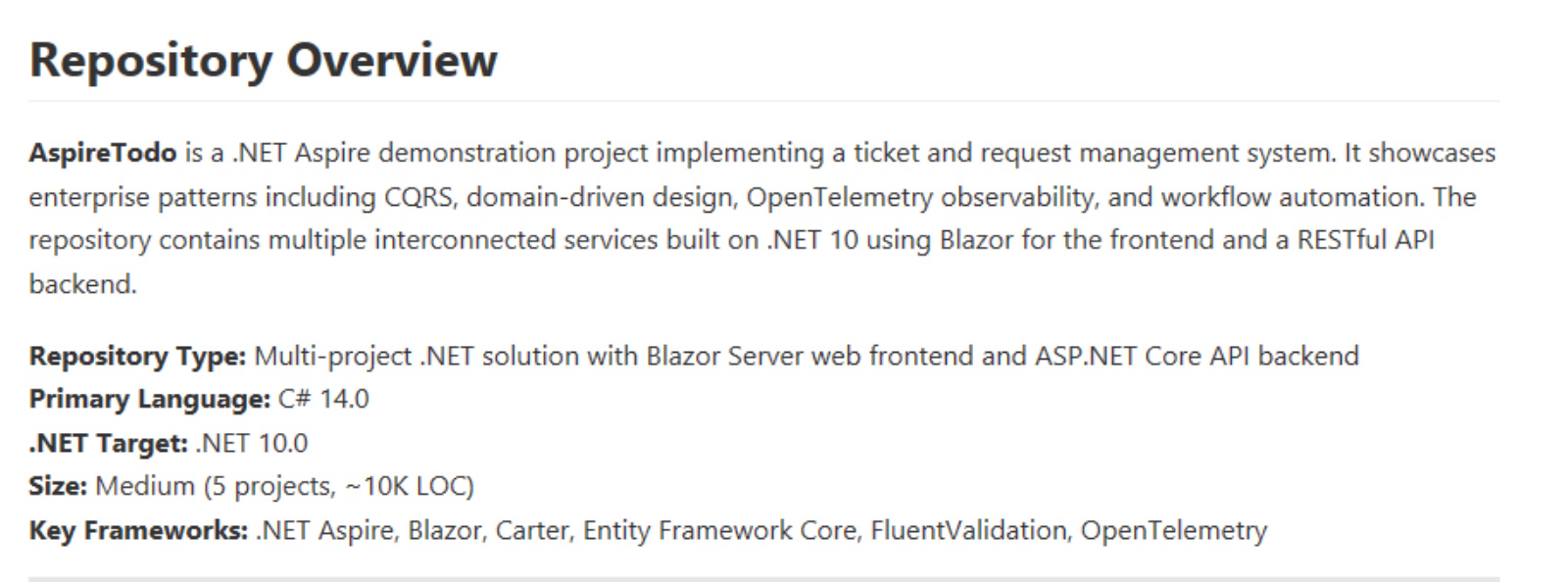
  • Repository Overview.  A good summation of the solution - probably better-suited to live in the readme.  All the information cited here is accurate and useful.
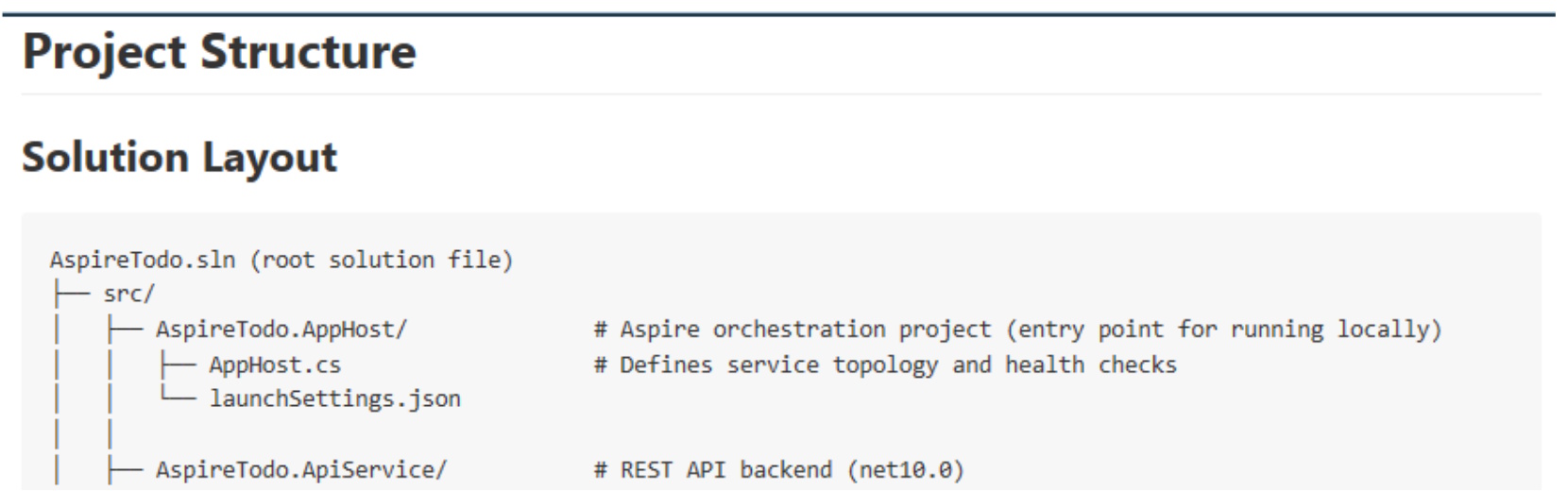
  • Project Structure.  Definitely useful, and definitely a section I’d look to move to readme. In fact, I believe I’d replace this in the instructions file with an explicit instruction to keep this area current as the project evolves.  Along these lines, I’d like to see how Copilot handles the project as it grows in size. The level of detail shown in this section could grow unwieldy in a larger solution.
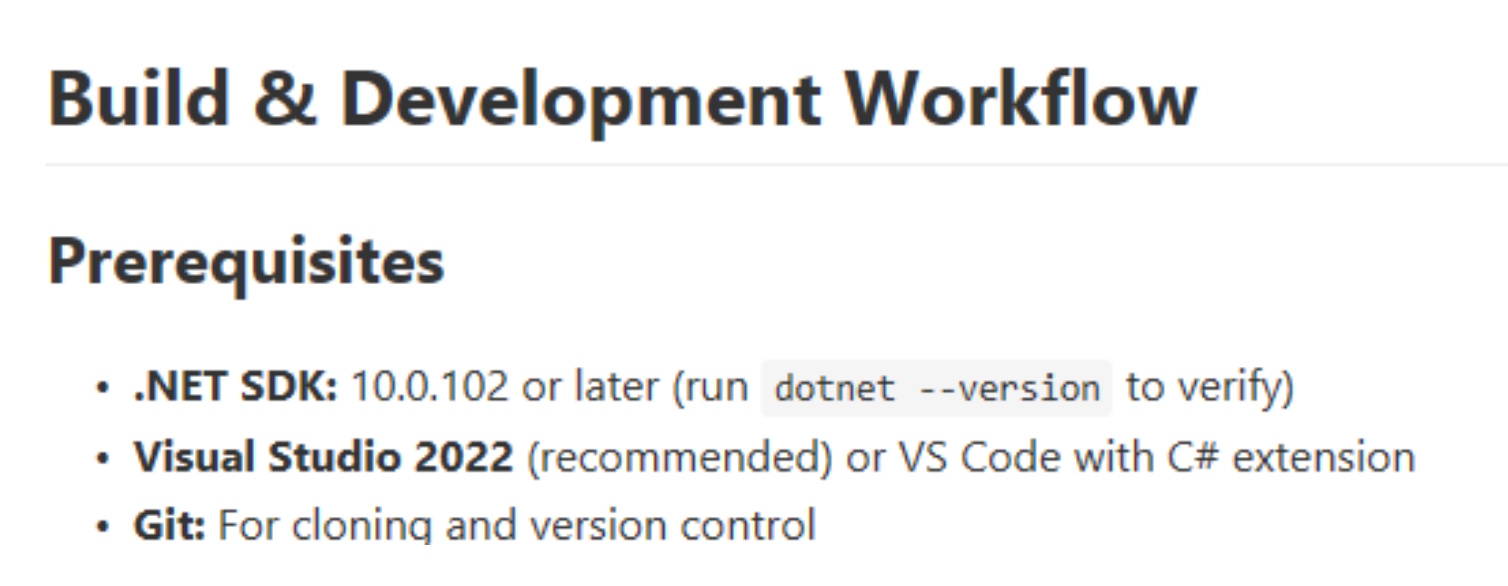
  • Build & Development Workflow.  I found this section interesting.  It’s the first place I spotted an outright mistake (indicating that VS2022 would be able to work with .Net 10).  Beyond that, the instructions seem thorough and useful, including some startup alternatives that could prove helpful and database setup and migration instructions as well.  Once again, it’s possible much of this would be well-suited to live in the readme file.
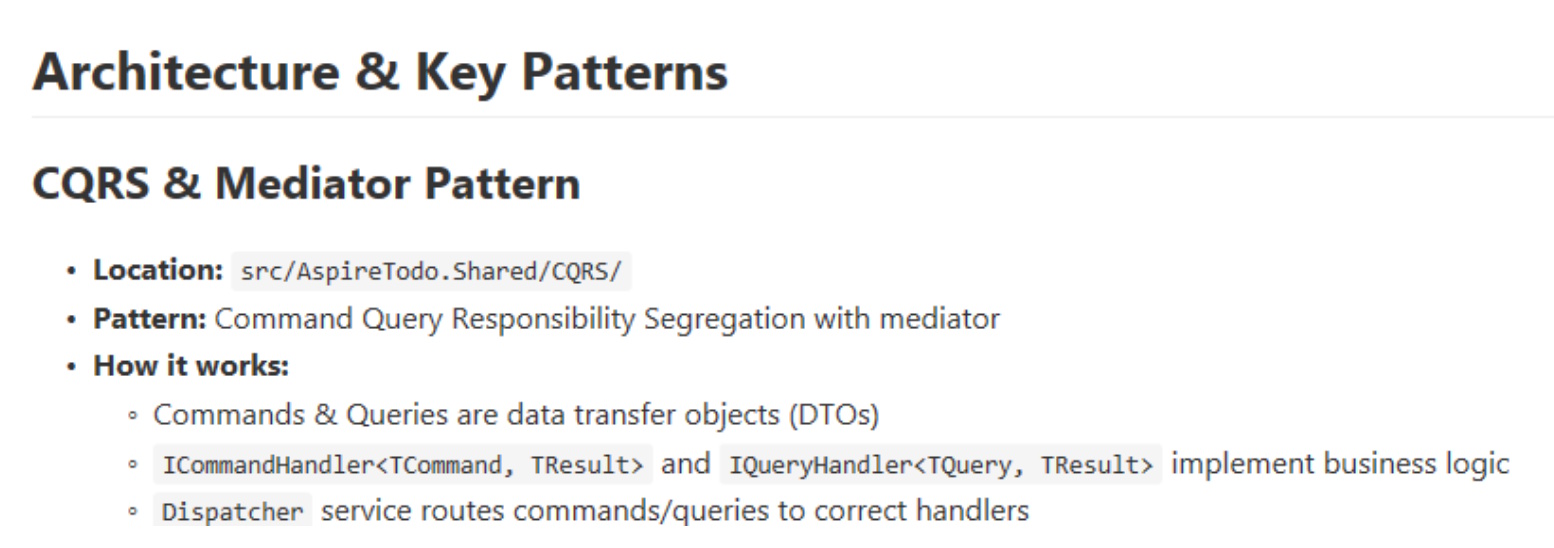
  • Architecture and Key Patterns.  An excellent section that summarizes design patterns and key integrations.  Again, frankly, one could argue this material could live in the readme.

  • Common Tasks & Gotchas.  This section began to get a bit odd.  There’s a bit on adding a new API endpoint that’s pretty good, but there’s also a bit on debugging JSON deserialization that seems like pretty general debugging techniques I’d expect to uncover when needed in Ask mode.
  • Known Issues & Workarounds.  This entire section suffers from the same problem - this entire section should be discoverable when needed and debugging topics shouldn’t be limited to the few topics presented in this section.
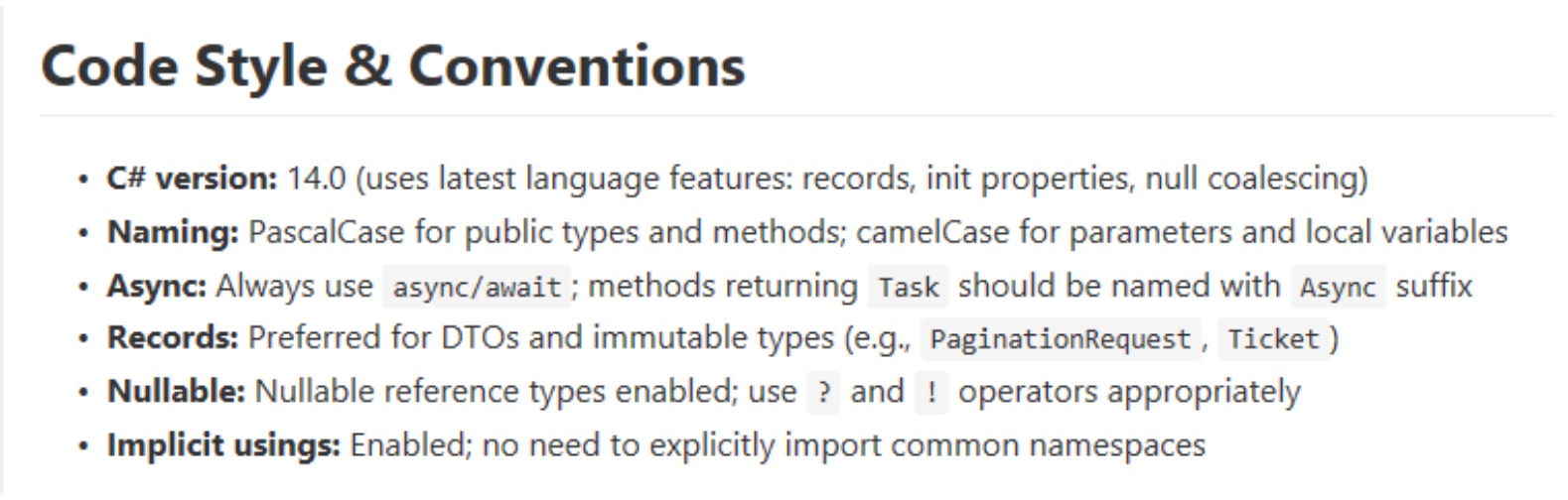
  • Code Style & Conventions.  A short, but useful section - definitely one I’d keep in instructions and expand upon.  In my opinion, this is exactly the sort of guidance I’d want to see in Copilot-instructions.  Expanding on this area could help keep coding style consistent as the codebase evolves - one of the main objectives of Copilot-instructions in the first place.  If you begin orchestrating instructions across repos (using MCP connections to a wiki, for instance), conventions like this would be appropriate for enterprise-wide use.
  • Troubleshooting Build Failures.  Back to material that should be general knowledge.
  • Final Notes.  Another useful section I’d keep and expand upon.  The are specific instructions to the Copilot agent - again, exactly the instructions I’d want to see in this file.

Putting it to the test

Before I fine-tune the instructions, I wanted to test Copilot to see if it seemed any smarter with the addition of the initial draft.  I made a copy of the original repo (so you can see the “before” version) and asked Copilot (still using Claude 4.5) the following:

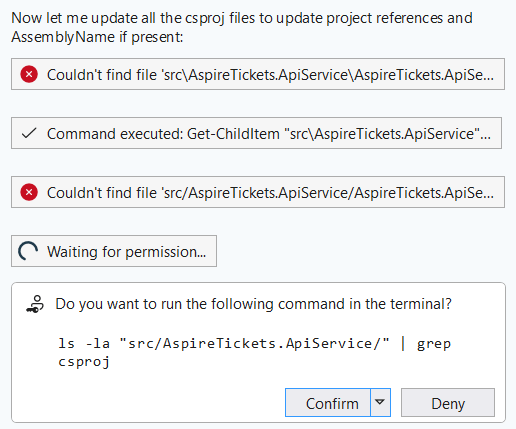
Copilot plotted a six-step plan and got stuck on step 2:

This is a problem I’ve seen frequently with Copilot: the powershell integration has a tendency to fail or freeze.  After closing the terminal, Copilot realized it needed another approach, and it tried again.  This went on for a while - the whole time showing success sprinkled with failure.  Had this been an actual developer, I’d have stopped them and suggested they revisit their plan, as it sure looks like a lot of guessing going on here.  The “stuck in powershell” problem continued as well – it seemed like Copilot expected powershell to understand commands that powershell just whiffed on - despite my installation being reasonably current.  

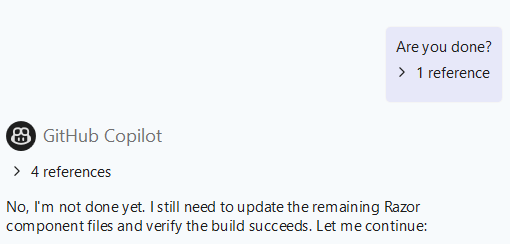
Finally, adding insult to injury, Copilot eventually just stopped working new tasks - apparently before it was done.  I gave it a little nudge, and sure enough - there was a little more work to do.

Finally - the build.  First attempt: five errors and two warnings.  All five errors were project files not found.  Copilot blamed them on Visual Studio’s cache, which seemed like a class-one cop-out. 

More confusion… more freezes.  Eventually, Copilot froze hard enough I couldn’t even cancel in the chat window, so I took matters into my own hands.  It turns out that aside from the file renaming issues, Copilot had gotten pretty close.  I had one “using” statement I needed to patch, and all the project files had to be removed and re-added, but once that was complete, I was back to building w/o errors again.

When all is said and done, did Copilot save me time in this refactor?  Maybe - but not by a ton.  I think the level of supervision is still quite high, but the remaining rough bits seem like they’re not so much a model shortcoming as an integration snafu - hopefully an easy update.

Next Challenge - adding to the UI

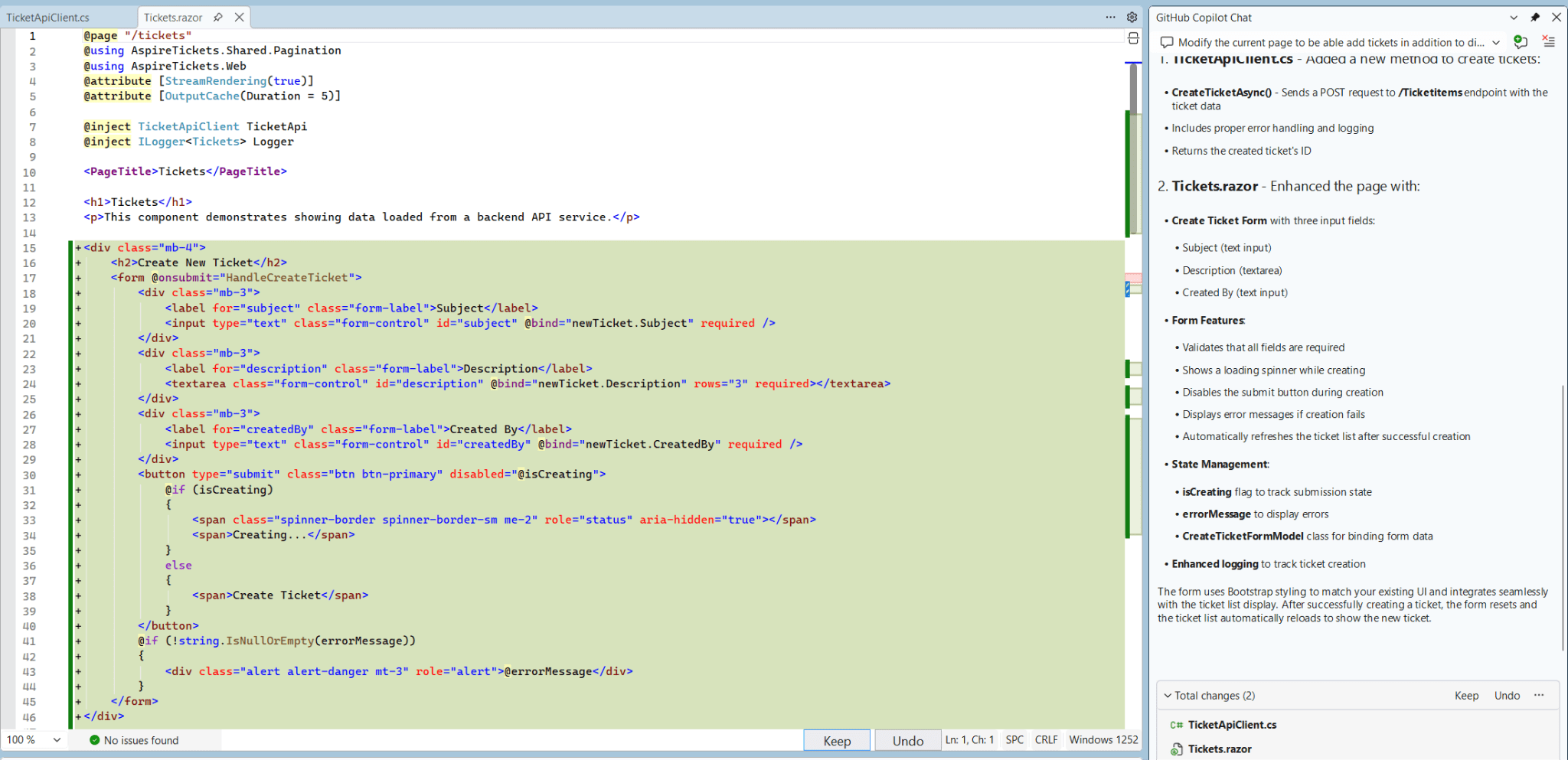
I suspected Copilot might do better with a change that didn’t require so many file manipulations, so I gave it a simple prompt that would require touching the solution in several places:

This request was dispatched quickly, and seems to have produced a high-quality output:

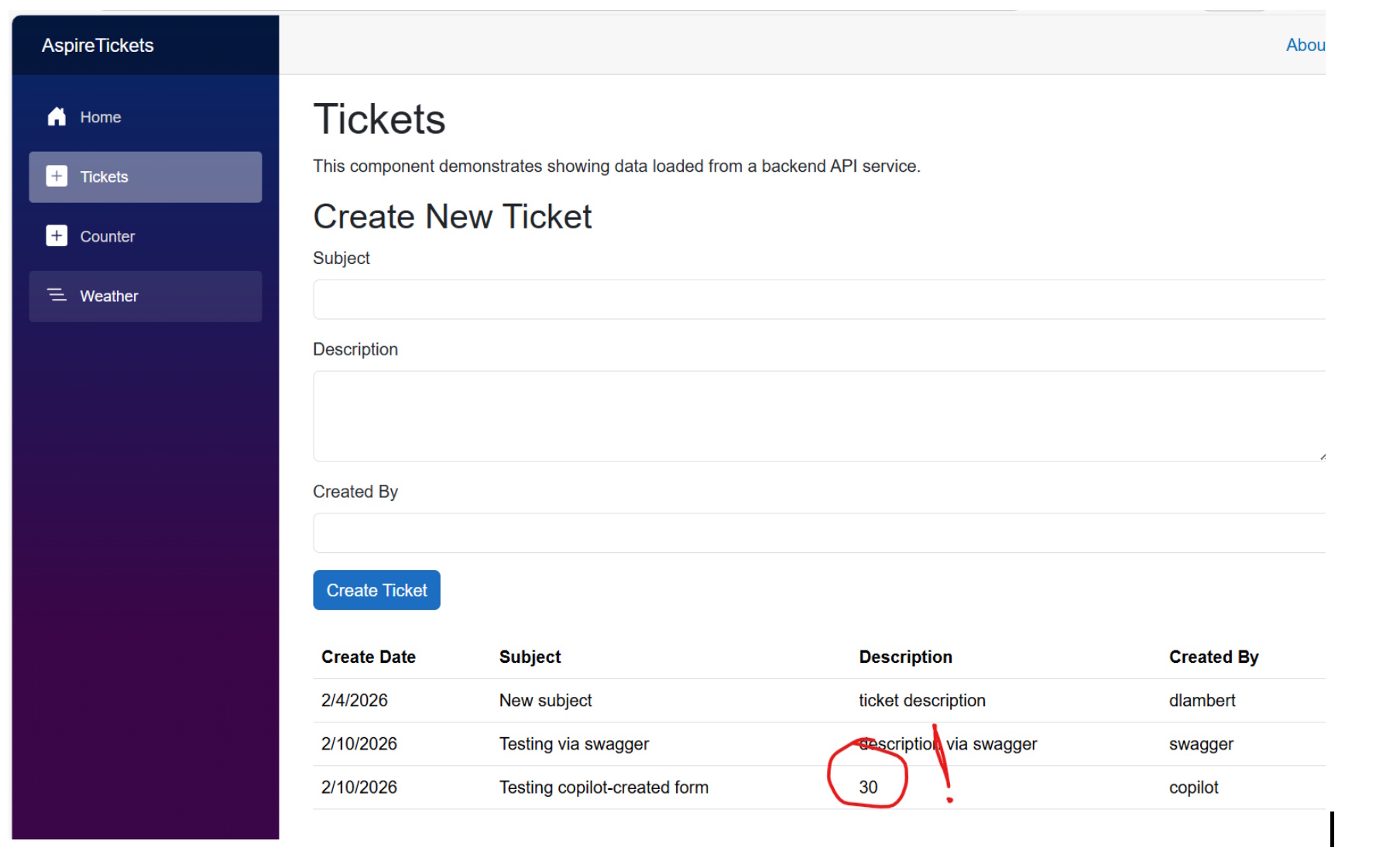
The project still built, and when I ran it, I saw a plausible-looking form.  The bad news: the form wasn’t submitting anything to the API, so I asked Copilot to fix it.  The resulting back & forth was almost comedic. I wasn’t about to let Copilot off the hook, and it did eventually figure it out.  I’d begun counting form submission attempts, and (if my count was right), it took well over two dozen stabs at this to get the form to submit successfully:


It could be argued that very little architectural guidance was provided to Copilot in the instructions we’d created, so the Blazor form submission stuff it struggled with might almost have been excusable.  I’m still a little disappointed here, though, because the real gotcha seems to have been an addition to .NET 10 (@rendermode) that was keeping the form from operating interactively, and the .NET version absolutely was covered in copilot-instructions.

For the last test / evaluation, I’m going to switch from Visual Studio 2026 to VS Code, and I’ll modify my prompt to specifically call out use of copilot-instructions, though I don’t believe this should be necessary.  This is the prompt used (including a typo on “architectural”):

I’ll be honest - I wasn’t expecting a drastic change in experience going from Visual Studio to VS Code, but wow, what a difference there was!  The initial change was quick, and as near as I can tell, perfectly functional.  I got an updated form that works as expected, the API adapter works, the API has been extended to include a new command, and the new command follows the design conventions in use by previous commands.  VS Code even asked me if I wanted it to test the new functionality, and that went slightly less-well – the spots where Copilot integrates to the world around it really do seem to be its Achilles heel right now.

Up to this last step, I believe I’d have given Copilot a barely-passing grade.  A co-worker from years back always used to remind me we don’t cheer for the dancing bear because it dances well – we cheer because bears aren’t supposed to dance at all, and this is about how I’d have summed up my experience with Copilot in Visual Studio.  Copilot in VS Code, on the other hand, seems much more well-sorted.

I’m still impressed with the amount of project documentation Copilot was able to sift out of my project, and I intend to press on with pulling some of the docs into readme and fine-tuning the bits that are left to be more prescriptive – in short, leaning on this a little more to get a feel for the edge cases.

An Unhelpful Exception

Last year, my son introduced me to a podcast called “Black Box Down”.  Each episode is a discussion about an air disaster of some sort, and in the vast majority of cases, the eventual BOOM is preceded by a long sequence of small problems, dealt with poorly, or over-reacted-to until recovery is impossible.

Exceptions are like that.

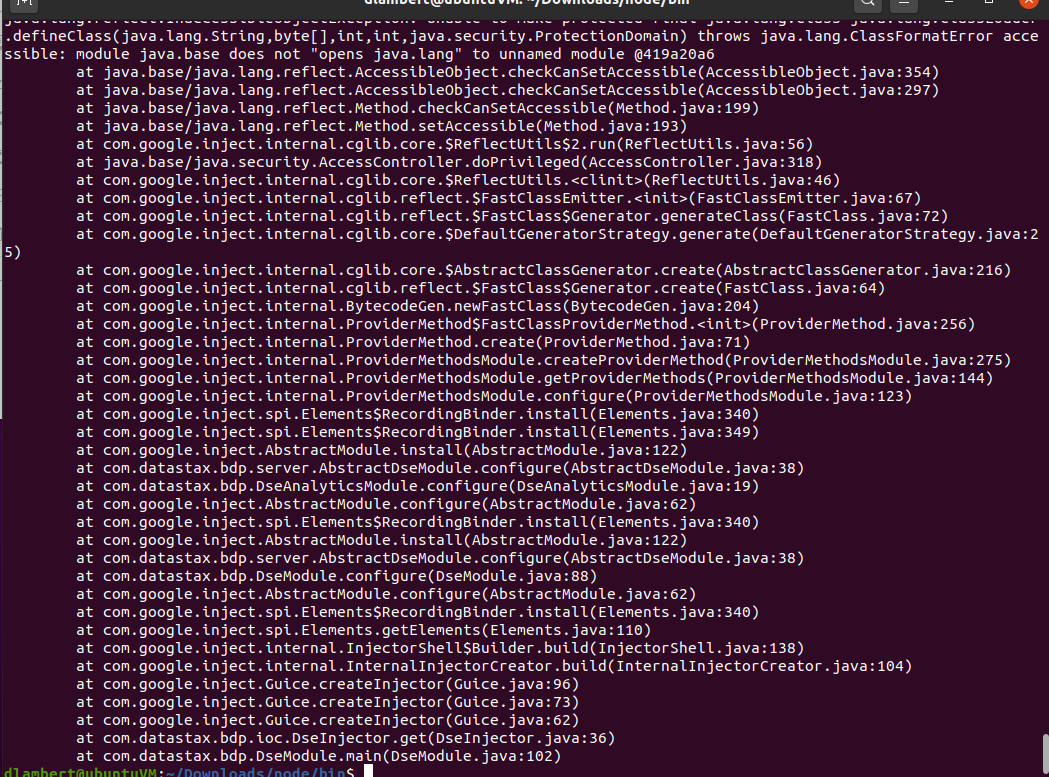
I’ve been working on getting DataStax / Cassandra installed on a machine running on Hyper-V, and although it’s been a little while since I experienced the joy of Java stack traces, it’s coming back to me in a hurry.  I Just worked through one that turned out to be rooted in my Java version.  It turns out when the installation requirements indicated Java 8 or better, they left out, “but not too much better”.  After a bit of googling, I found a link suggesting I might need to roll back my Java version, and that did, in fact, make things better.  The process to diagnose has left a bit to be desired, though - starting with the epic stack trace..

What might have been better than this?  How about an assertion on startup to flag the Java version as a problem?  Once upon a time, this software was using a contemporary version of Java, and it would never have occurred to any reasonable developer to put an assertion like this in place, but at this point, it would be really helpful.  Do I have any reasonable expectation that this sort of assertion would make it into the source code?  Nope.  I fully expect that anyone expert enough in this package to contribute to it is well aware of the Java version required, so there’s just no benefit to them to include an assertion like this.  Next problem: packages built on packages built on packages, which make it pretty hard to pin down who should really be responsible for calling out the version dependency.

You may be thinking at this point that an IaC or container solution might be helpful, and I agree.  In this particular case, one of the alternatives at my disposal was an Oracle Virtual Box image that was already set up.  I opted out of that because I’ve already set up Hyper-V and Docker Desktop, and I’m concerned about having too many virtualization platforms sparring with one another.  The “bare metal” setup wasn’t ideal right out of the gates, but the silver lining in this case is that I’m learning a ton.

My biggest takeaway from this experience is going to be to “embrace the suck” – paying attention to the frustration and impact on productivity so I can watch for problems like this in software I’m producing.  As always, putting yourself in your users’ shoes will pay dividends, I believe.

Why we Architect for Experiences

Change is afoot once again. We've heard a ton about 5G for the last couple years, and we're just now starting to see this technology emerge in the market. Plenty of pundits have speculated that 5G is going to have the same magnitude of impact as the introduction of the web or the birth of mobile computing. Last week, we saw Facebook launch a major rebranding last week. The Metaverse is coming, powered in part by that same 5G network.

What's the connection to 5G? Edge computing and experiences. In this article from Ericsson, Peter Linder cites 5G as a key enabler for AR and VR without the use of a tethered PC. Few of us can imagine how our business applications will take advantage of experiences like this, but recall that just a few years ago, we'd have had a hard time imagining the rich mobile applications we take for granted today.

These new experiences aren't going to take the place of the experiences we've got today -- they're going to add to them. If you're not already seeing the same explosion in channels, that's coming, too. Partners, new brands, bundled products -- all these channels demand access to the capabilities you've got, packaged up in new ways.

There's no way to support this explosion without careful separation of experiences from capabilities. You should never see the mechanisms by which a command is carried out implemented in the same place your customer experiences it!

Spotify has some great experiences enabled by this sort of separation. I was streaming from my desktop PC this week through my "good" speakers (better than my laptop!), but I also had a Spotify window open on my laptop. I just happened to see the play list sync'ed to the laptop screen, and when I clicked next there, my session on my desktop followed right along. Although this is an ultra-simple example, it's evidence that Spotify is using its interfaces to send Commands to a back-end service -- nothing about the session that's streaming is connected to the commands at all -- otherwise, the audio source would have changed!

At this point, a little faith may be required in order to see a need like this in your enterprise, but for those with preparation on their side, I believe a myriad of new experiences will be possible in a few short years.

A whole lotta chickens

You may be familiar with the old joke about the chicken & pig's relative contributions to breakfast -- the chicken, of course, being involved by virtue of providing the eggs, and the pig being committed vis-a-vis the bacon.  The origin of this saying is now lost to antiquity, but it has been adopted as an illustration of dedication by sports personalities and business coaches because it manages to capture these relative levels of engagement succinctly and powerfully.

I found myself reaching for the chicken & pig business fable this week in the context of Product Ownership.  We've got a back-office product that's just not getting a lot of love from the business -- lots of people who want to provide input, but nobody who's interested in taking ownership.

This isn't unexpected or unreasonable.  Product Management as a professional discipline is still largely nascent.  On top of that, initiatives that raise the top line are always an easier sell than back-office cost-center programs.  For these reasons, I'm not sure that accounting, billing, document-management and other cross-cutting infrastructure-like programs are likely to lead the way in agile adoption or digital transformation, but transform they must -- eventually.

HTML is dead! Long live HTML!

While catching up on newsletters from CodeProject, I came upon an interesting article talking about the "why" of JavaScript UI's -- not the typical "how".

Why JavaScript is Eating HTML

In "Why JavaScript is Eating HTML", Mike Turley walks through the "classic" static HTML for structure + CSS for appearance + JavaScript for behavior example, and then examines how this application evolves as JavaScript begins to control the application more deeply by interacting directly with the DOM.

Reflecting on this article, we've done this sort of thing before.  Going all the way back to CICS to run terminal applications on mainframes, we've separated UI structure from behavior.  Microsoft Access had its forms, which propagated to Visual Basic, and eventually to .Net, WPF, XAML, and so on.  Static is easy, and frankly, it works pretty well most of the time, but as UI behavioral needs become more sophisticated, these static structures are ill-equipped to handle those needs.

So, I'm skeptical these techniques are going to put HTML out of business anytime soon, but in a dynamic application, they make a boatload of sense.

Different is Interesting

Last week, I was reminded of a lesson I learned from one of my mentors many years ago: when you're regression testing, "different" is all you really need to look for.

A little context would probably help, here.  Nearing the end of a sprint, we'd tested the new features in the sprint, but we really weren't sure whether we had good regression coverage.  Testing from prior sprints had part of the answer, but we couldn't really afford the time to run all the tests for this sprint and all the tests from our prior sprints.  Thus, the conversation turned to regression testing, automation, and tactics to speed it all up a bit.

The naive approach to regression testing, of course, is to run every test you've ever run all over again, checking each value, examining the dots on the i's and the crosses on the t's.  It's absolutely irrefutable and in the absence of automated tools, it's also completely impractical.  With automated tools, it's merely incredibly difficult, but fortunately, in most cases, there's a better way.

Segue back to my years-ago epiphany, in which I was struggling with a similar problem, and the aforementioned mentor gave me a well-aimed shove in the right direction.  He pointed out that once I'd achieved "accepted", and thus, "good", all I needed to look for when regression testing was "different".   All by itself, this didn't do much to help me, because looking for "different" still sounded like a whole lot of looking.   Combined with the fact that our application was able to produce some artifacts, however, this idea vaulted our testing forward.

Our application, it turned out, supported importing and exporting to and from excel files, so we were able to use this to radically speed up the search for differences -- we saved an export from a known good test, and future tests would just import this file, do some stuff, and export it back out again.  At this point, a simple file compare told us whether we'd produced the same output we'd previously validated as "good".

Armed with this technique, we began looking for other testable artifacts -- to the point where we built in some outputs that were used only for testing.  At the time, it was time well spent, because the maturity of testing tools made the alternatives pretty prohibitive.

And what do you do about a difference when you find one?  First reactions notwithstanding, it's not necessarily a bug.  A difference could arise as a result of an intended change, so it's not at all unusual to be able to attribute a difference to a change you're actually looking for; in which case, you throw out the old baseline and replace it with a new one.  Just remember you'll need to explain each difference every time you find one, which brings me to a final issue you'll want to sort out if you're going to use this technique.

Any artifact you want to use in this way must be completely idempotent -- that is, when you run through the same steps, you must produce the same output.  This seems like a gimme, but you'll find that a lot of naturally-occurring artifacts will have non-idempotent values like ID's, timestamps, machine names, and so on -- you'll need to address these in order to have artifacts you can use effectively for testing.

Once you get past this little hurdle, you're likely to find this idea powerful and super-easy to live with, and what more can you ask for in regression testing?


The Software Iceberg

I spoke with a software manager recently who's considering selling some software that's working great for their company. "We're about 90% done," he mentioned, with the implication that he's nearly ready to unleash his creation in the marketplace, and I immediately recalled one of my earliest lessons in "product", and one that's echoed over and over through the years.

When it comes to productizing software, "done" is usually just a good start.

The prototypical software-to-product path starts with an application that's built to solve a business problem. Once the software is proven, the leap to selling that software seems like a minor increment.

If you didn't build productization into your work from the onset, though, you'll need to address a whole host of concerns. Not all of these will apply to each new bit of software, but if you don't have all this support in your company, you'll need to develop them.

  • Branding. If you're a widget company, you can be the best widget company in the world and still find it difficult to sell whosiwhatsits. Don't count on a lot of umbrella support for a software product unless your main business bears a strong resemblance to that software, and if it does, be prepared for nervousness among your prospects - they'll be (rightly) worried about you gobbling up their businesses once you've sold them your software. Branding, marketing and sales are first-class concerns if you're really going to sell software.
  • Support. This is huge -- your life will change as soon as you sign a customer to a software deal. You'll need more than a guy to man emails and phones -- you'll need to be able to replicate problems your users are seeing, help them use your software to solve problems you've never encountered, and educate them on all aspects of your platform. If your software features any integration, be prepared for many multiples more demanded of you and your team.
  • Maintenance. Somewhat related to support, you'll need a plan to maintain software over time if you're going to keep your customers happy. This is no accident; your ability to release updates and new software versions across a number of customers can only occur with careful planning and precise execution.

Each of these needs is worthy of more pages of discussion, but suffice it to say these are all contributing reasons why software products are so much more challenging than internal applications. In my opinion, this also brings greater reward.

Microsoft HomeOS

I'm not sure how I missed this up till now, but Microsoft is apparently looking into the same home automation space that Google is trying to gobble up with its Nest acquisition.  Microsoft's project (still in their research lab) is called HomeOS, with an accompanying software kit for devices called Lab of Things.

I'm really not sure whether to laugh or cry yet, because having long been a proponent of Microsoft to go kill this market, it really seems like they're still missing the real bread & butter features needed to start printing money.  I watched the demo video on the HomeOS page, and just about the whole damned demo is about seeing appliances blink on and off in response to arbitrary events -- all on a Windows phone, of course.  They finally touched on user access at nine and a half minutes into the ten-minute video, despite that being arguably the most important feature of all.

So listen, Microsoft -- if there's anyone out there still interested in making money, here's how you do it.

  • HomeOS (or whatever this product winds up being called) needs a form of ActiveDirectory.  One place -- for real -- to set up and administer users, including extended family members, friends, guests, etc. -- with a single interface so I can light up guest WiFi and TV streaming for a guest, for instance, without needing to hit four or five different devices.  Once this is in place, I promise I'll never buy another device that doesn't authenticate against this directory, ok?
  • Speaking of devices, I'm actually way less concerned about electronic doorbells than I am about XBoxes, NAS devices, and routers.  Get this stuff to work together really, really seamlessly, and you might single-handedly save BestBuy.
  • Continuing on the theme of devices, I'll repeat my recommendation to buy Drobo.  Host your HomeOS on it, including AD, and package it to look like (and live next to) an XBox, including high-speed interconnection.  BOOM!  Microsoft owns the living room.  The damned thermostat is an afterthought after that, you know?
  • Let me tunnel to the HomeOS box I buy for Mom & Dad.  They're not going to administer their own smart home, even if they can accomplish incredible things in less than 250 lines of C#.  (Are you kidding me???  Is that *really* a feature??)
  • If you're going to let me tunnel to other HomeOS locations, it's a pretty short leap to go ahead and buy a router company, too, isn't it?  Plug that bad-boy right into my X-Drobo-thing, and configure it from the same interface.  Make it easy enough for my nephew to set up, and keep it secure, too, if you think you can pull that off.  That'd be great.
  • If you require me to use a Windows phone to use all this warm fuzziness, you can flush it all down the pot.  You're too late on this one, and you're going to have to embrace Android and maybe even IOS.  You should have listened to me earlier on that one.

Seriously, Microsoft -- if you manage to snatch defeat from the jaws of victory on this one, I'm not going to feel too sorry for you.  This should be a big 'ol gimme -- just by re-assembling some tech you've already got.  Give it a shot -- I'll bet there's plenty of time to sell brilliant doorbells later.

Home PC administration — another lost opportunity

I've written in the past about places where Microsoft could absolutely *own* the infrastructure of the home by establishing a beachhead in the living room -- not to mention the previous assertions about their development tools.

I still believe quite strongly that a well-targeted home computing platform is just a couple of software tweaks away for Microsoft.  Today's edition is all about authentication.  I've got a bunch of PC's at home, including some VM's.  I've also got a Drobo 5N and a PS3 and a bunch of networking equipment.

You know what stinks?  I need to set up logins on every single one of these devices individually, and they're not connected to one another (so "Fred" on one box isn't really the same login as "Fred" on another box).

Stupid.

Microsoft, give me a lightweight Active Directory for the home -- something I can obtain without buying a Windows Server license, okay?  Here's a hint: if you built this into thew new XBox, I'd buy one, and I bet a bunch of other people would, too.  Let me use this for DNS, so I can type "router" into my browser and actually get my router, instead of making me set up a HOSTS file on every single PC I own.  By the way, how many average consumers would even know that's possible??

I fully expect that the new XBox, when it arrives, will let me stream photos and music off my Drobo, but if you want to really take this idea to the next level, how about selling us a Pogoplug -type of device I can give to my Mom & Dad so I can (1) set up user names for them, and (2) let them see photos that I don't plan on uploading to Flickr, etc.?  The idea here, by the way, since I'm spelling everything out in excruciating detail, is that just about every family has one or more members somewhere who (a) own a gaming system, and (b) understand enough about computers to be the family SysAdmin.

Get it??

Oh, and by the way, since you've given up on Windows Home Server for reasons I've never quite been able to fathom, and since you now aspire to be a "devices + services" company, why don't you just go ahead and buy Drobo and make their stuff work with yours?  I'd happily plug mine into a new XBox.

I swear, if Microsoft were able to get their collective heads out of whatever orifices they're lodged within long enough to make an XBox that actually acted like it was part of a family, they'd crank up another WinTel-style monopoly to last them a good dozen more years.

Enhanced by Zemanta

Why is it so hard to buy a standard developer workstation?

It's spring, 2013, and Intel has just released its Haswell processors and chipsets.  Motherboard vendors are touting their new wares and all the manufacturers are announcing new products.  As luck would have it, it's about time to refresh workstations in our office, too, so it's a fine time to take stock of the current state of the art for desktop systems.

So, without further ado, if you're a developer, you want a system along these lines:

  • Intel Core i7 -- Haswell is great, but Ivy Bridge would be fine.
  • At least 16 GB RAM.
  • An SSD boot drive - 128-256 GB.
  • Mirrored 7200rpm data drives - around 2-3 TB.
  • Integrated graphics are ok unless you do any serious graphics work.

As an aside, I checked my notes from 2009, and these are almost identical to the specs I put together the last time I looked at systems.  We've gone through a couple generations of CPUs and chipsets, and the "sweet spot" for storage buys about double the capacity now, but the rough idea is about the same.  I figure the cost for a system like this is down a third since then, too.

Incidentally, if you're a professional in a content-generation field (web design, illustration, photography, video), this is a decent starting spot for you, too, though you'll probably want to toss in a stout video card to help with the graphics.  Although you might be tempted to save a few bucks here or there, every single one of these elements is there because it adds value for a professional who relies on his equipment.  Nothing about this configuration is exotic or surprising.

Despite this, I continue to be astounded that nobody sells systems that look like this.  Obviously, you can build it yourself, and if you know the first thing about computers, I highly recommend this -- you'll wind up getting better parts, and there's something to be said for knowing your kit is built right.  Some shops would obviously rather buy PC's than pay people to assemble them, though, and so it is here.  Off to Dell.com, then.

Before I start ripping Dell, I've got to point out that I've generally been a fan of theirs.  I've used something approaching dozen of their PC's and laptops at work over the years, and I've got a Dell laptop at home that's recently been retired because it stopped charging. I used to have a Dell 1U server in my basement running VM's, in fact.  Noisy, but a nice little machine.  I've got no ax to grind with Dell, per-se.  Despite this, they're dead to me now.

I've always found their product lines to be a bit too complex, and their configurator is just about as much fun as a poke in the eye with a sharp stick.  I'd forgotten about this, but I shopped their site back in 2009 to see if they could build a system along the lines I indicated up front.  They couldn't.  Back then, this was disappointing, but not terribly surprising.  Intel's RAID-enabled chipsets were fairly new, so practical mirroring was fairly novel, and SSD's were just beginning to trickle down from enthusiast systems.  Today, both of these things should be considered absolutely mainstream.  I honestly don't understand how both of these features aren't considered standard equipment for anyone who makes more than minimum wage.

On top of not being able to build the system I wanted, the web site absolutely blew chunks.    As soon as I visited the site, I got one of those "Will you leave your opinion?" pop-ups, and every time I selected a system, the page scrolled over to the top-right, where a "Chat with Dell" window appeared, offering me help.  Offer accepted.  Needless to say, "Brandon" wasn't able to help me: "...and no workstations that we have will allow an SSD boot hard drive and then mirrored 2nd and 3rd hard drives."  No kidding.  I also participated in their feedback session.  At the end, they asked if I had any additional notes for them.  I did:

The last time I tried shopping for a system here was 2009.  At that time, I was looking for a Core i7 desktop with around 16GB RAM, an SSD boot drive and mirrored data drives.  I couldn't find one.  Today, I tried shopping for the same thing, and guess what -- can't get there from here.  This is a standard configuration for developers, and you literally can't buy it from Dell.  You guys might want to worry a little less about how your buyout is going and more about building PC's.  Just sayin'.

So, that was Dell.  The good news is that HP fared better.  I opened the site without drama, and found a desktop right off the bat that would support the configuration I wanted. The system I wound up configuring used an Ivy Bridge processor instead of Haswell, but at least I could get something close.  Dell, I know you probably sell far more PC's to secretaries and call center workers than you do to developers, but if you don't hold the high ground, you're going to get your head handed to you on commodity systems.

Anyway, it's been nice knowin' ya, Dell.

Enhanced by Zemanta